
Plans and licensing
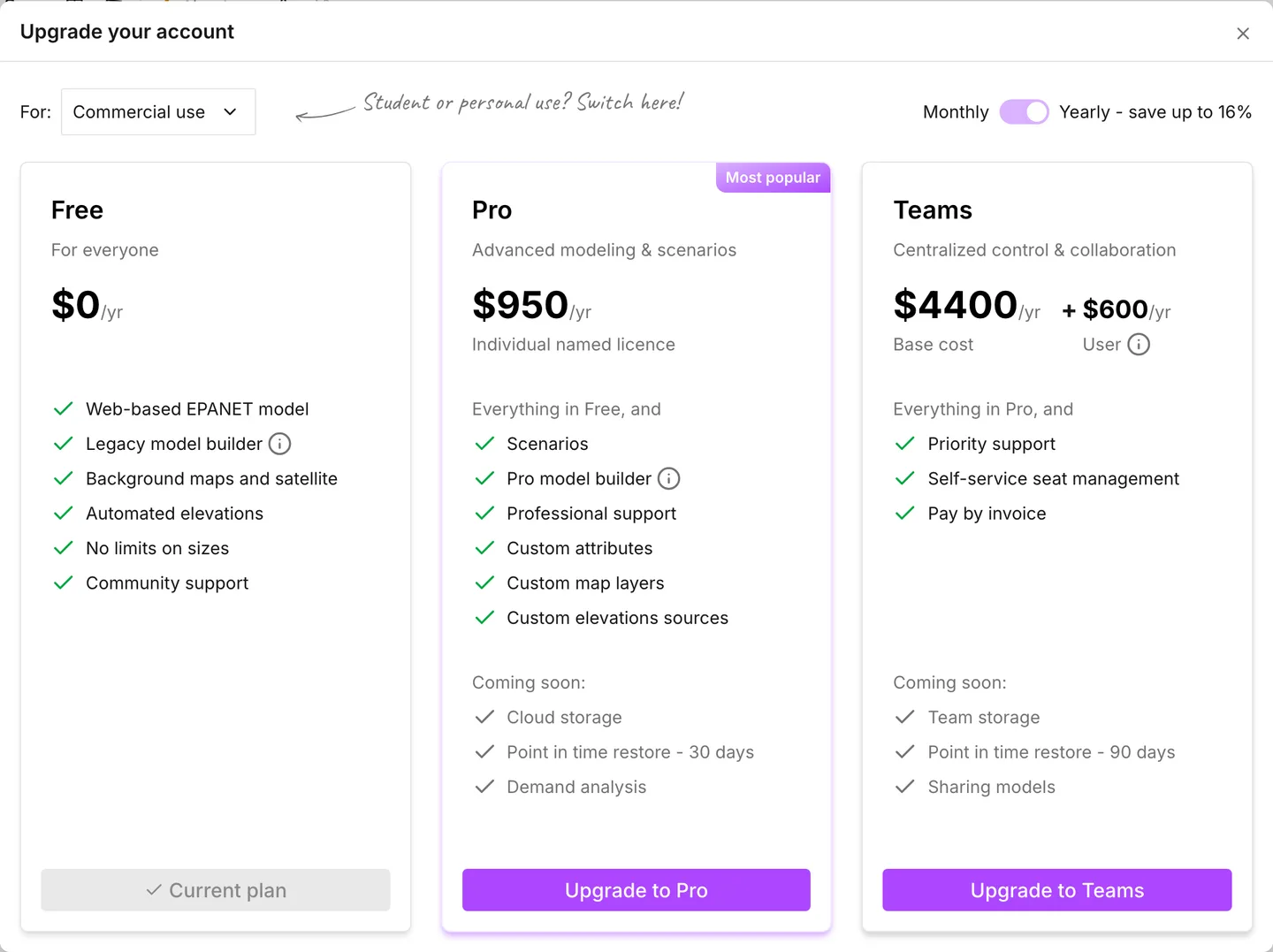
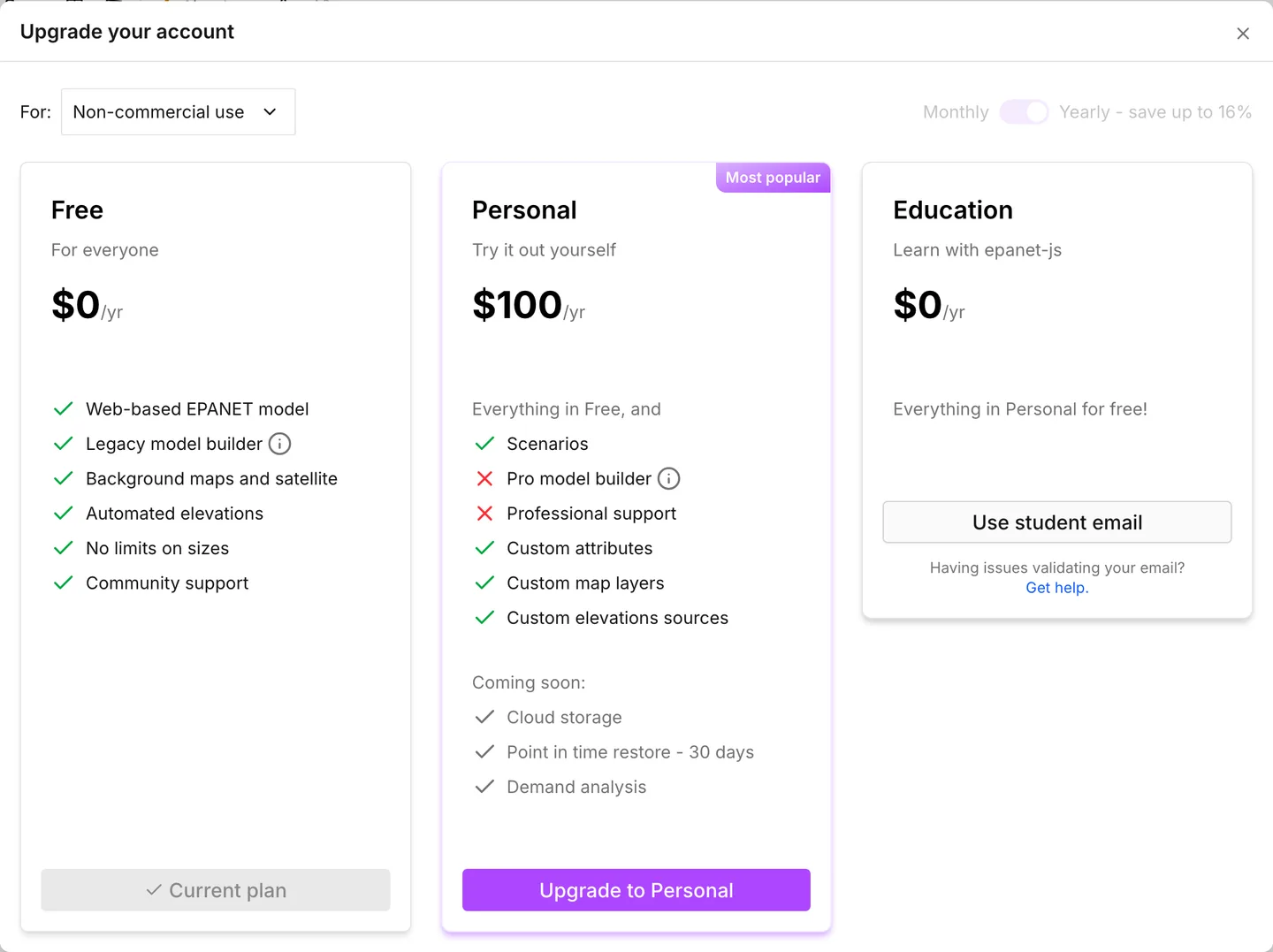
epanet-js has a free plan, three paid plans, and an Education plan that costs nothing. The plans that you see depend on what you use epanet-js for. The Upgrade button in the menu bar opens Upgrade your account. The first control on it is a switch between Commercial use and Non-commercial use. Commercial shows Free, Pro and Teams. Non-commercial shows Free, Personal and Education.
The free plan does not expire. It covers commercial work as well as personal work, and it puts no limit on the size of a model.
Commercial or non-commercial
Section titled “Commercial or non-commercial”Commercial use means that you use epanet-js to support a business, to deliver paid services, or to do official government work. This is commercial work:
- Consulting and design for clients
- Modeling inside a utility or an engineering firm
- Contract work that a university department is paid for
- Work in a local, regional or national government role
If that is what you do, and you need more than the free plan, the plans to look at are Pro and Teams.
Non-commercial use means learning, teaching and research that is not tied to paid work. This is non-commercial work:
- Coursework and academic research
- Self-directed learning
- Modeling of hypothetical systems
- Portfolio projects
- Tutorials or videos that you make about the app
Personal and Education are the plans for that work.
Two cases come up often:
- Non-profits and NGOs: the answer depends on the work. Paid staff who do professional engineering with the advanced features come under the commercial terms. The free plan covers a good deal of what a small organization does.
- If you are not sure: the free plan is a legitimate answer for as long as it does what you need. support@epanetjs.com will tell you which category a particular case falls in.
What each plan includes
Section titled “What each plan includes”These are the cards as Upgrade your account lists them.
| Plan | Use | Includes |
|---|---|---|
| Free | Either | Web-based EPANET model, Legacy model builder, Background maps and satellite, Automated elevations, No limits on sizes, Community support |
| Pro | Commercial | Everything in Free, plus Scenarios, Pro model builder, Professional support, Custom attributes, Custom map layers, Custom elevations sources |
| Teams | Commercial | Everything in Pro, plus Priority support, Self-service seat management and Pay by invoice |
| Personal | Non-commercial | The Pro list without Pro model builder and without Professional support |
| Education | Non-commercial | Everything in Personal for free! See Education plan |
Pro, Personal and Teams each list a Coming soon group. This group is not part of what you pay for today. On Pro and Personal it holds Cloud storage, Point in time restore - 30 days and Demand analysis. On Teams it holds Team storage, Point in time restore - 90 days and Sharing models.
What is behind a plan
Section titled “What is behind a plan”This is the practical list. It gives the features that stop at a gate, what the gate looks like, and where the gate does not apply.
| Feature | On the free plan you see | Free on a demo network |
|---|---|---|
| Scenarios | Upgrade to access scenarios | Yes |
| Zones | Upgrade to import zones | Yes |
| Custom attributes | Upgrade to use custom attributes | Yes |
| The pipe library | Upgrade to use the pipe library | Yes |
| Pipe Material and Year of installation | A lock on the row, then Upgrade your account | Yes |
| Native pump controls | Priority access | Yes |
| Saving collections | Save your own collections in the panel, then Upgrade your account | Yes |
| Custom map layers | Upgrade to add custom layers | No |
| Custom elevation sources | Upgrade to use your own elevation data | No |
| Recalculating elevations | A lock on both entries, then Upgrade your account | No |
| The asset lists behind Model attributes in Network Review | Every rule and its count, with the lists faded out | No |
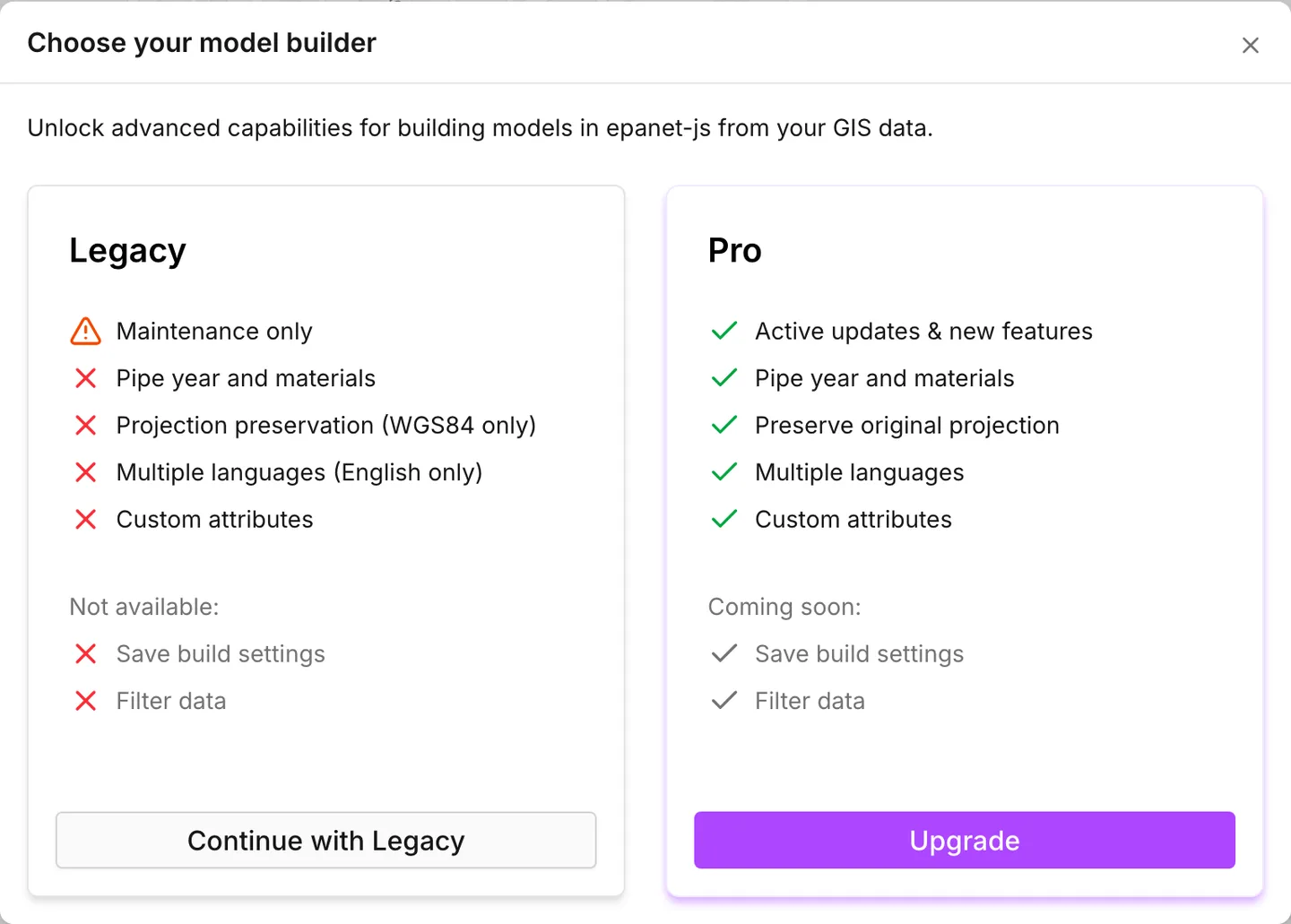
| The Pro model builder | Choose your model builder, with Continue with Legacy beside it | No |
The last column is important before you decide anything. When you open Drumchapel or Waterdown from the welcome dialog, seven of those features work with no gate. You can use zones, custom attributes, the pipe library, native controls, collections and a whole scenario comparison before you pay anything. See Quick start.
Three different gates
Section titled “Three different gates”The dialog that you meet tells you which kind of gate stops you.
- A paywall: a title that begins with “Upgrade to”, a short description and a video of the feature. This is a paid feature and you are not on a paid plan.
- Priority access: the feature is on the paid tiers. The dialog explains that new features go to paid plans for their first 30 days. Native pump controls are the one feature that uses this gate.
- Early access feature: this gate has nothing to do with money. It opens when you sign in with any account. See Accounts and privacy.
What a paywall offers
Section titled “What a paywall offers”The paywall is a dialog, not a dead end. The way out is on its right-hand side, under the description of the feature. On the free plan, while a trial is available to you, a line appears there. The line says that a free trial gives full access for 14 days with no credit card. Below it are Start free trial and Explore plans.
Start free trial starts the trial immediately. When the trial is active, Your trial is now active! appears. The scenarios paywall then creates the scenario that you asked for, and the other paywalls close. During the trial, the menu bar shows the time that is left, for example Trial: 14 days remaining. This text takes the place of Upgrade.
If you are signed out, Start free trial asks you to sign in or register first. When you are signed in, Activating trial starts by itself. It ends with Your trial is now active!.
A trial needs a work email. The app refuses an address from a free email provider and shows Work email required for trials. An account with such an address can still upgrade to Pro.
Explore plans replaces the description with a choice of two sides. On Non-commercial use, Personal licence - $100/year goes straight to a checkout. On Commercial use, Choose plan opens Upgrade your account at the commercial cards. Back returns to the description.
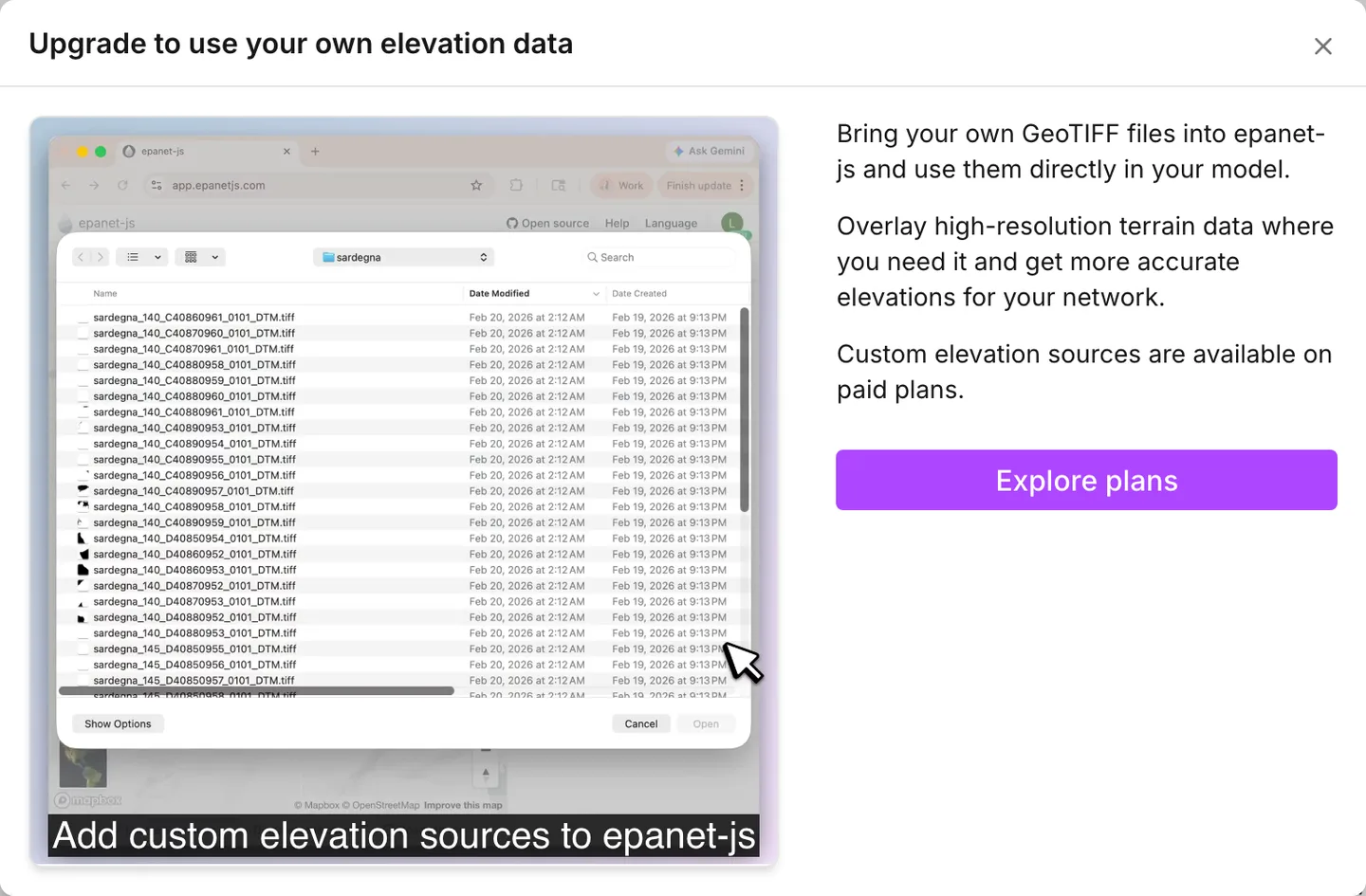
If the account already had its trial, or if the app refused its email, no trial is available. In that case, the paywall says that the feature is available on paid plans. The paywall ends with Upgrade to Pro, which opens the checkout for a yearly Pro plan.
Some panels show a smaller upgrade box in place of a paywall. One example is Save your own collections in the Collections panel. While a trial is available, the box offers Start free trial directly.
On a demo network, the features that the table marks Yes have no paywall. When you open Drumchapel or Waterdown, these features work with no gate. This includes scenarios.
How to upgrade
Section titled “How to upgrade”-
Press Upgrade in the menu bar. The button is there whenever you are signed in on the free plan, except during a free trial. On a narrow window, it is in the side menu.
-
Choose Commercial use or Non-commercial use. The monthly and yearly switch applies to the commercial plans only. The non-commercial side is billed yearly, and the switch is grayed out there. Yearly - save up to 16% says what the yearly option saves.
-
Press the button on the card that you want. Each card carries its own price. The Teams price is a Base cost plus a price for each User, with a Minimum 2 licenses.
While a trial is available to you, the Pro card with yearly billing offers Start free trial in place of Upgrade to Pro.
Upgrade to Pro and Upgrade to Personal open the checkout on the billing site in a new tab. The app shows Waiting for payment… while it watches for the change. It watches for about a minute, and it starts again each time you come back to the tab. This is what makes a return from the checkout enough.
When the new plan comes through, the dialog closes by itself and Upgrade successful! appears. Every other tab that you have open picks the change up without a reload. If you close the waiting dialog, it cancels nothing.
Request quote on the Teams card does not go to a checkout. It opens a request form in a new tab. That form is also the route for payment by invoice or by purchase order.
On a paid plan the Upgrade button is gone. Anything that opened the plans dialog before says Plan changes require support instead. To change or cancel a subscription, go through support@epanetjs.com.
Self-hosting
Section titled “Self-hosting”We publish the source of the app under the Functional Source License. You can run it on your own servers, with every feature available and no license to buy from us. This does not carry support, updates or bug reports. Those belong to the hosted service that these plans are for.
- Education plan — free access for students and educators, and why you must arrange it at sign-up.
- Accounts and privacy — the early-access gate, which is not a plan.
- Scenario work — the paid feature most people meet first, and the demo-network route into it.
- Build a model from GIS — the two model builders, and which plans get to the newer one.
- FAQ — the short answers.